What is the difference between “land-based” and shipping-oriented file transfer services?
Some shipping companies use generic solutions such as OneDrive, SharePoint, Dropbox, etc. Others prefer “purpose-built for shipping” solutions to handle their daily data exchange needs.
In this article, we’ll explain the key differences between Dualog Drive, OneDrive and SharePoint – and why leading shipping companies choose Drive for their data exchange needs.
What makes data exchange in shipping so special?
As maritime operations become increasingly digitalised and integrated, there is a greater need for data exchange between ship and shore. However, the nature of shipping makes this particularly challenging.
- Ships operate in remote locations, relying on satcom systems that can be unreliable.
- Ships and company IT infrastructures are loosely integrated, complicating data sharing in real time.
- Compliance with various international regulations requires extensive and frequent data reporting. For example, audits require extensive manual data collection from multiple sources.
- With increased file flow from fleet management and departments such as HR, Safety and Technical, maintaining a steady and streamlined exchange of digital documents between ship and shore is challenging.
- Ships entering and leaving the fleet need to be handled quickly, given their integration into the fleet data flow.
- There is no easy way to monitor the status of all fleet transfers per ship.
Due to all these factors, efficient and accurate data exchange in shipping is a difficult task.
Dualog Drive compared to OneDrive and SharePoint
1. Adaptability to shipping operations
Dualog Drive
We have built Dualog Drive to handle typical shipping operations like no other data exchange tool available today.
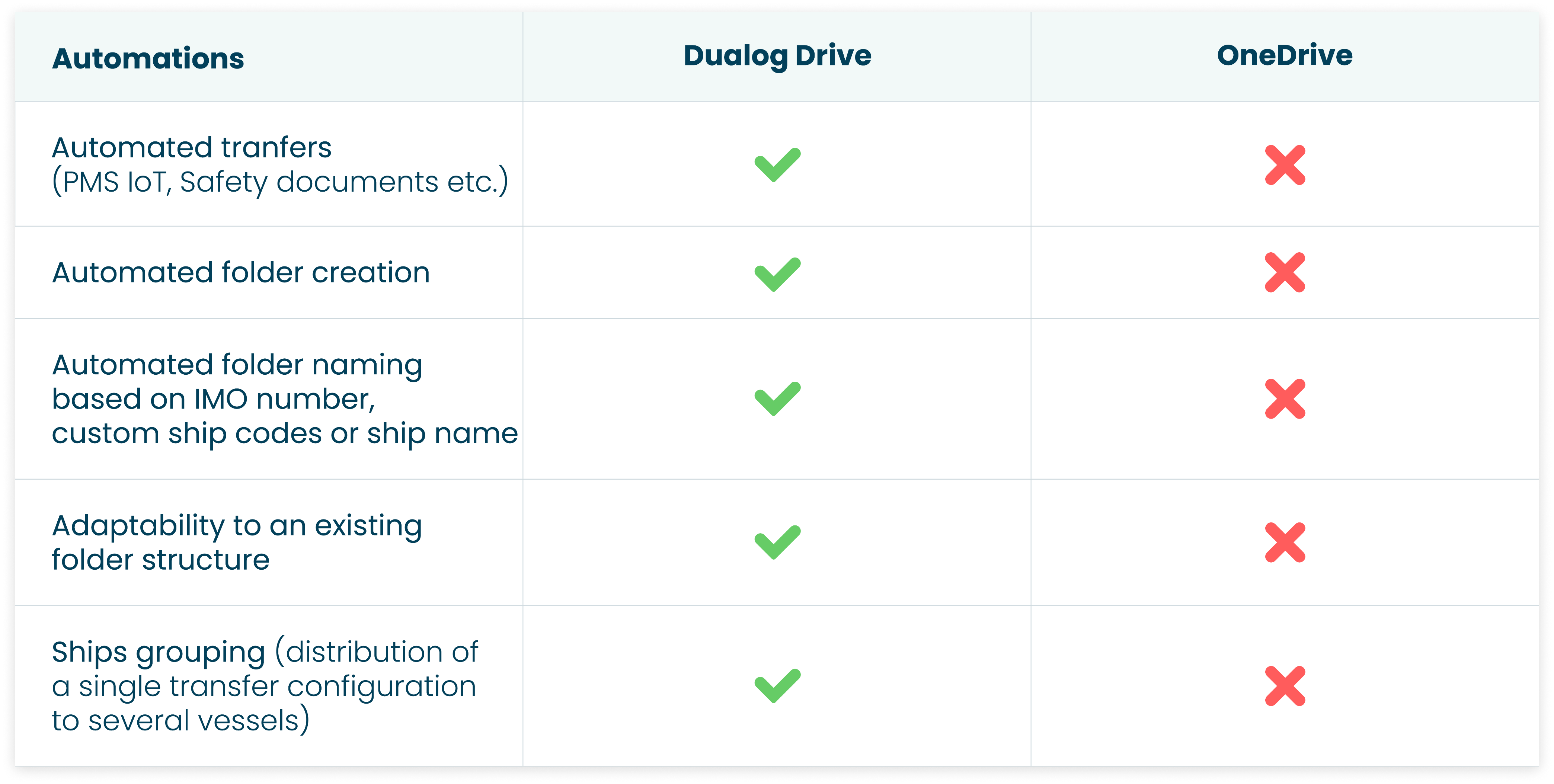
1. You can create customised file transfer tasks and automation to collect and distribute files between your ships and shore-based offices.
For example, you can easily move and synchronise PMS and SMS files and distribute crew training videos. You can also use the service to collect IoT and VDR data.
2. With Dualog Drive, using dynamic folders avoids the hassle of defining destination folders for each ship. Dualog Drive automatically creates folders on each ship and ensures they are consistently named based on the ship name, IMO number, or any of your own custom folder names (based on type of transferred data, role e.tc.). Using dynamic folders makes this an easy task, automatically routing transfers to each vessel as needed. Learn more
3. You can send data to or from a single ship or create groups of vessels with a single transfer configuration. The portal makes it easy to add or remove ships to receive data from.
Read our customer story: File transfer and data sharing in TB Marine Shipmanagement
OneDrive and SharePoint
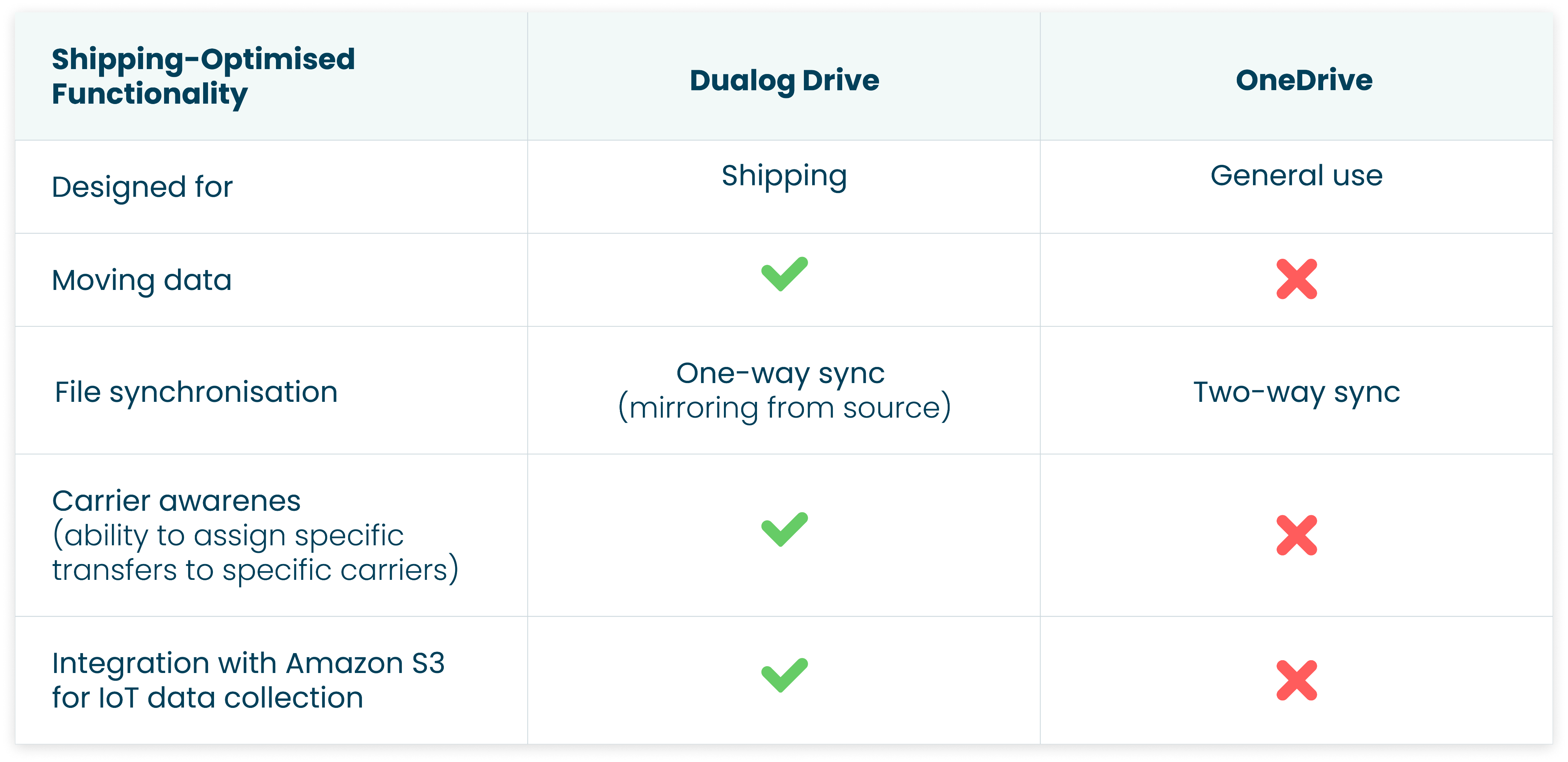
Neither SharePoint nor OneDrive is optimised for creating maritime-specific tasks and automations (such as automated replications of PMS data provided by TM Master or other PMS systems, or collection of IoT and VDR data from multiple sources).
2. Moving data
Dualog Drive
Drive offers automated data movement. Once new files are detected at the ship in the specified folder, they are automatically transferred to the shore destination.
With the Move feature, files are removed from the source folder once they are sent, saving disk space. You also have the option to add a backup folder if needed. This allows you to automatically move IoT and VDR data from ships or PMS data to and from vessels.
OneDrive and SharePoint
OneDrive and SharePoint only sync folders and are not able to move files.
3. Syncing files
Dualog Drive
One-way synchronisation ensures data flows between a master source and the destination systems in one direction only (from ship to office or vice versa). This mirroring process provides a single source of truth, which prevents conflicts and inconsistencies caused by simultaneous updates between two systems.
One authoritative source preserves data integrity and maintains consistency across all synchronised systems.
If you have a large fleet, you must avoid the complications of two-way synchronisation.
OneDrive
OneDrive mainly offers two-way synchronisation. This can be challenging to manage in large fleets due to potential conflicts and data loss.
Furthermore, OneDrive doesn’t allow you to automate tasks for groups of vessels or one specific ship. You have to manually distribute dozens of files to or from ships. This can cause delays and errors.
4. Distribution of documents
Dualog Drive
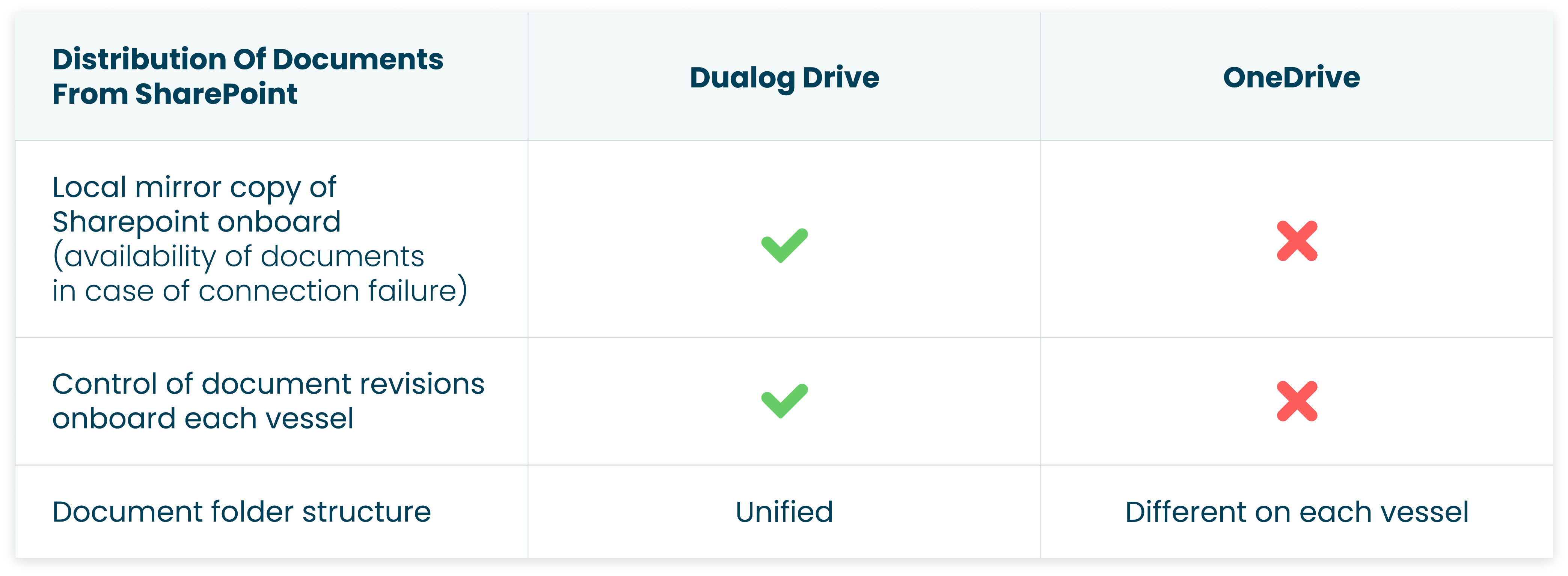
Dualog Drive can be integrated with SharePoint, which simplifies and speeds up collaboration and file sharing between ship and office. It’s a seamless integration with a tool you’re already used to, letting you work in an environment you already know.
The Dualog Drive–SharePoint integration (and Drive’s mirroring function) enables a unified folder structure on all ships and makes it easier to navigate across documents.
Furthermore, your team can exchange data with your fleet directly from their SharePoint directory, such as:
- Manuals and drawings
- Audits and Inspections
- Notices to fleet
- Certificates
- Technical reports
Files will be distributed via satellite on the right carriers, with data compression and automatic failover in case of network failure.
In the Dualog Portal, it’s easy to configure who will receive documents, and it will not require any input onboard ships. If changes are made onboard ships, Drive will revert the document to its original state without having to download any data from shore. You have full control of which revisions are onboard each vessel.
You may also want to read: 5 use cases for Dualog Drive in the maritime industry in 2024

The Drive-SharePoint integration streamlines processes and reduces email clutter, since SharePoint will be the centralised storage for documents, manuals, procedures, etc.
OneDrive and SharePoint
Neither SharePoint nor OneDrive is able to ensure ships’ access to the documents in the cloud, in the event of a connection failure. Different folder structures on vessels make it hard to save documents in the correct place. Controlling what folder or file you share with a specific ship is difficult.
5. IoT data collection to Amazon S3
Dualog Drive
With Dualog Drive, your vessel IT department can automatically send IoT data and other analytics data from your fleet directly to Amazon S3 cloud storage.
AWS S3 has many benefits for shipping companies. It’s scalable, robust and easy to access. This allows you to efficiently manage and analyse your vessel’s IoT and sensor data, so you can make better decisions and have more efficient operations.
For example, Japanese shipping giant NYK Line uses Dualog Drive to replicate their IoT sensors to AWS S3.
OneDrive
Using OneDrive, you can’t send IoT data and other analytics data directly to Amazon S3 cloud storage, since OneDrive only syncs and is unable to move files to the cloud.
6. Carrier awareness and connectivity
Dualog Drive
The coverage of high-bandwidth satellites like Starlink is limited when ships trade in restricted areas.
Dualog Drive’s carrier awareness can be used to take advantage of higher-throughput terrestrial connectivity, such as LTE, when ships are in port or close to shore.
Furthermore, you can allow another carrier (with a slower speed) to continue replicating files while pausing non-critical large replications when the primary carrier is unavailable.
Dualog Drive also lets you assign specific transfers to specific carriers. This ensures that critical business data will still be delivered even if you lose connection with the primary provider.
OneDrive
OneDrive is unable to differentiate between internet connectivity options. Imagine you lose connectivity or your primary carrier goes down. In such a case, OneDrive will typically be blocked, or you will be unable to prioritise the critical task/data to be transferred.
7. Monitoring of all fleet transfers
Dualog Drive
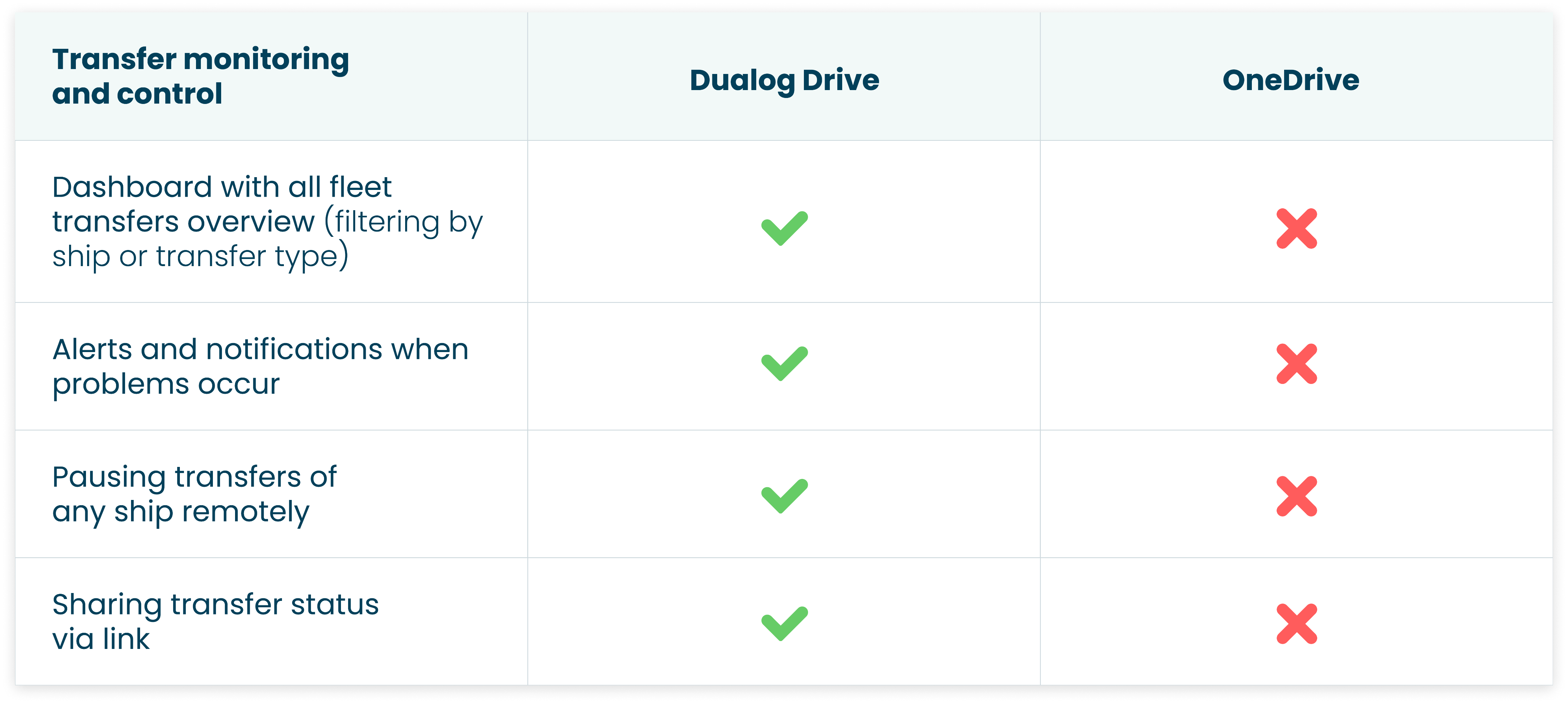
Different departments in your shipping company receive different files from your ships. Dualog Drive makes things easier for both parties by providing a consolidated view of all file replications across different applications in just one interface.
For example, it’s easier to monitor the status of data transfers and manage potential issues such as disk space and folder access.
With the ShareView™ feature, you can share the status of a specific transfer with any stakeholders, such as operations, HR, captains via a secure link. This simplifies work, reduces the pressure on IT staff, and brings more clarity to your processes.
ShareView™ makes it easier to monitor data transfers and encourages teamwork between ship and office teams. This results in better decision-making and communication.
Read our customer story: How Torvald Klaveness optimise ship to shore data transport
OneDrive and SharePoint
OneDrive and SharePoint do not have a unified interface. It becomes complicated to keep track of who has received the updated document or who has not, especially in large fleets. It’s impossible to know if the files onboard are up-to-date.
8. Support
Dualog Drive
Dualog Drive offers specialised, 24/7 support tailored to shipping-specific requirements. Whenever you have a problem, you’ll get help right away, via phone and email.
Dualog’s support team is familiar with the unique challenges faced by vessel IT and can provide faster, more effective solutions.
OneDrive and SharePoint
Even though SharePoint and OneDrive offer support, they don’t provide the same level of specialised, round-the-clock service required for global maritime operations. They also lack the hard-earned shipping industry expertise to quickly deal with problems.

What type of data exchange solution is best suited for shipping?
SharePoint and OneDrive work great for file sharing and team collaboration on shore.
OneDrive: Best for personal file storage, individual document management, and small-scale sharing and collaboration.
SharePoint: Best for team collaboration, document management at scale, creating intranets, and automating business processes.
However, these solutions were created without taking into account the complex requirements of shipping.
Dualog Drive, on the other hand, has been built in close collaboration with shipping companies worldwide – to meet the unique challenges and requirements of the industry. The solution enables your ships and office to easily distribute, collect, and sync files and folders according to your fleet’s specific needs.
Drive offers purpose-built features such as carrier awareness, custom task automation and seamless integration with SharePoint and AWS S3. It helps you maximise the benefits of SharePoint by extending it to your ships.
Read our customer story: MOL Chemical Tankers save 200 man-hours a month with Drive
We continually add new features and functionalities, and our in-house R&D team ensures the service is always shipping-optimised.
All this ensures unmatched efficiency and reliability regarding maritime file transfers.
Data exchange between ship and shore, and vice versa, needs to be done in a way that adds value, frees up man-hours and simplifies your daily operations. You can do this easily using a data exchange solution designed specifically for shipping.
Install Dualog Drive on your vessels in minutes and try out automated data exchange with your fleet for free. Sign up for a free trial